

What do the change of seasons, the mountains of West Virginia, and the palm of your hand have in common?
All have the potential to weaken a cellular signal.
For IoT devices, reliable connectivity depends on the strength and stability of the signal reception. But as any traveler or hiker in a dead zone can tell you, cellular providers do not guarantee service everywhere. Signal strength at a given location will vary.
This eBook describes why signal strength can be so elusive — referencing key metrics like RSSI, RSRP, and RSRQ — and outlines several best practices for optimizing performance across a range of IoT devices.
Table of Contents
Rather listen to a 1-minute recap of this eBook?
What Causes Signal Interference



The Environment
Before you blame your cellular IoT router for a weak signal, remember — invisible forces around it might be doing more harm than you think. Cellular signal performance depends on far more than just tower distance; environment also plays a major role.
Hills, trees, and buildings can block or scatter radio waves, just like they do with AM/FM, TV, or Wi-Fi signals. Heavy rain, fog, or snow can absorb or scatter radio waves.
Building Materials
Not all building materials are created equal. Step inside a concrete building and you'll instantly notice the difference: walls, layouts, and even interior finishes can turn a strong outdoor signal into a frustrating one-bar experience for your connected equipment.
Specifically, brick or concrete walls can weaken cellular reception by 8-20 dBm, while Low-E, double-pane glass may slash it by as much as 40 dBm. Metal siding or roofing is even more unforgiving. Signals can be completely trapped, leaving IoT devices searching for a lifeline.
Electrical Noise
Then there's other interference you can't see, from neon lights and refrigeration compressors to MRI machines. These technologies can generate electrical noise that wreaks havoc on your connection.
Knowing about these forces can help you avoid placing antennas or routers in high-noise zones. It will also be easier to troubleshoot unexpected drops in signal quality if you know about hidden disrupters in advance of a cellular IoT deployment.
The Basics of Signal Strength and Quality
Every cellular device uses a radio transceiver to connect with towers or repeater stations. But unlike a typical cell phone, an IoT module doesn't show signal bars. Instead, it reports several precise measurements that help remotely assess network health and signal strength. These are:
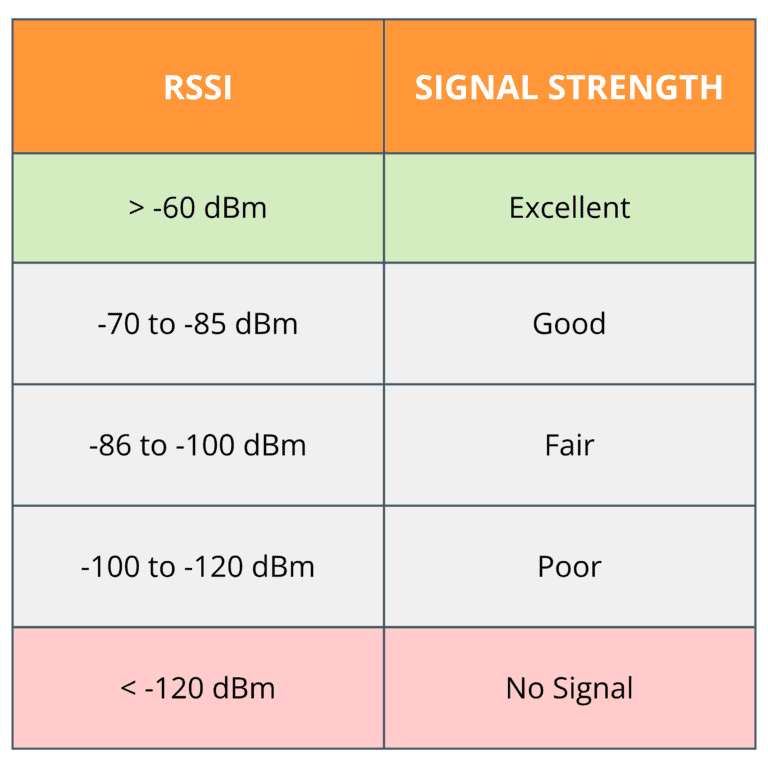
1. Received Signal Strength Indicator (RSSI)- Expressed in negative decibel milliwatts, RSSI measures the radio signal's total power across the entire bandwidth of measurement, including interference, as received by the cellular IoT device.
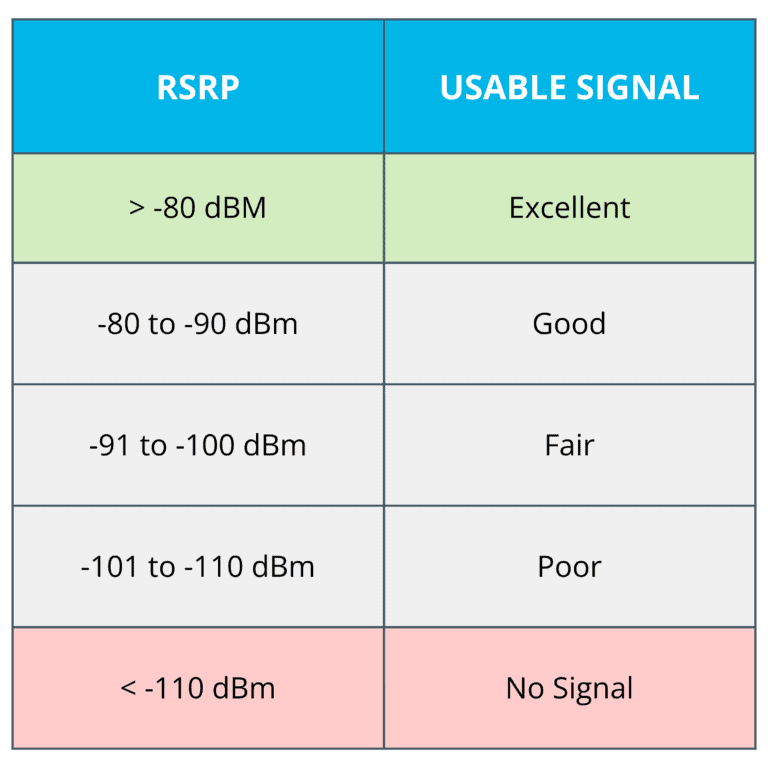
2. Reference Signal Received Power (RSRP) - Also expressed in negative decibel milliwatts, RSRP assesses the strength of the tower's reference signal for 4G and 5G networks, focusing only on the reference signals from the serving cell.
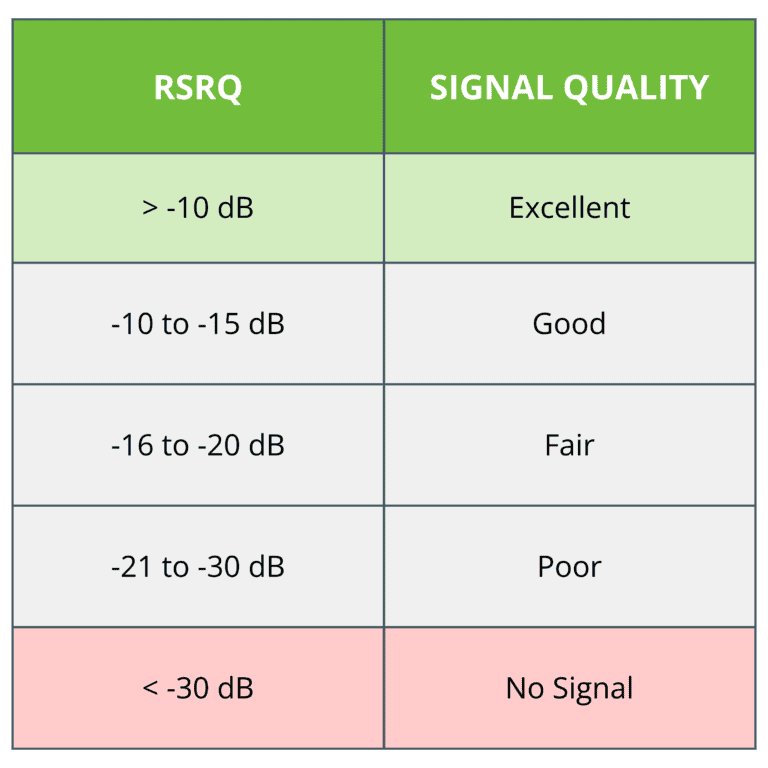
3. Reference Signal Received Quality (RSRQ) - Expressed in negative dB values instead of dB milliwatts, RSRQ provides a metric for the quality of the reference signal relative to noise and interference.
Total Power of the Signal - RSSI
RSSI offers a quick snapshot of how well a device can “hear” the cellular network, for a direct impact on reliability and performance. For instance:
Because IoT devices generally run unattended and may be deployed in challenging environments like utility closets, kiosks, or remote outdoor sites, even small differences in signal strength can determine whether data flows smoothly or connections drop intermittently.
A stronger RSSI generally means fewer retransmissions, lower power consumption, and more consistent uptime – all of which are critical when IoT devices are expected to deliver data continuously without intervention.
Power from the Tower - RSRP
Unlike RSSI, which includes noise and interference, RSRP isolates the actual usable portion of the signal.
For cellular IoT, RSRP is especially valuable, since it can evaluate whether or not a device is receiving a strong enough connection to maintain reliable data transfer, even in environments where surrounding signals may cause distortion.
Typical RSRP ranges: -44 dBm (excellent) to -140 dBm (extremely weak)
A Measure of Quality - RSRQ
RSRQ captures the quality of a cellular connection by measuring how much interference or network load is impacting the signal. It reveals how clean or stable the connection truly is.
For cellular IoT deployments, RSRQ matters because it indicates whether devices can reliably transmit data even in areas with heavy traffic, competing signals, or fluctuating network conditions.
Typical RSRQ ranges are -3 dB (excellent) to -19.5 (poor)
Most IoT routers and modems make RSSI, RSRP, and RSRQ readings available through their device management interface.
Depending on the hardware, these values may be found:
1. On the router’s status or diagnostics page (via web portal or local interface).
2. In a cloud management dashboard (e.g., OptConnect Summit) if the device is remotely monitored. Through command-line or AT commands for direct module access.
3. Through command-line or AT commands for direct module access.
In nearly all cases, there's no need for extra tools — the router itself provides these metrics. RSSI is usually displayed prominently, while RSRP and RSRQ are often located under more detailed cellular signal metrics or advanced diagnostics sections.
Technology-Specific Guidelines
While most IoT applications operate on 4G or 5G connectivity, some are designed for either shorter- or longer-range devices.
Here are few examples of IoT technologies that can tolerate different levels of signal strength.



Cellular IoT (4G/5G)
For these networks, RSSI is useful, but it doesn't give the full picture. RSRP and RSRQ offer better detail. An excellent signal will generally be higher than -90 dBm RSRP and above -65 dBM RSSI.
However, all three metrics provide helpful data on signal strength and performance for high-availability equipment that can't afford downtime (e.g., payment kiosks, digital signs, ATMs, security systems).
Low Power Wide Area (LoRAWAN)
A LoRAWAN setup can operate at very weak RSSI values—even below the noise floor — and still maintain reliable connections.
This capability is particularly valuable in devices like utility meters, smart parking sensors, soil monitors, and similar applications. A good RSSI will be higher than -115 dBM and above -7 dB SNR.
Bluetooth® Low Energy (BLE)
Like LoRaWAN, BLE primarily reports RSSI as its measure of signal strength. A value close to -60 dBm indicates a nearby, strong connection while -85 dBm or worse indicates a weak/distant signal.
BLE technology is specifically designed for short-range, proximity-based use cases like beacons, indoor navigation, and tags).
Choosing the Right Antenna and Accessories
Both the type of antenna and its placement are important to achieving strong, reliable
cellular connectivity, but they influence performance in different ways.
Types of Antennas
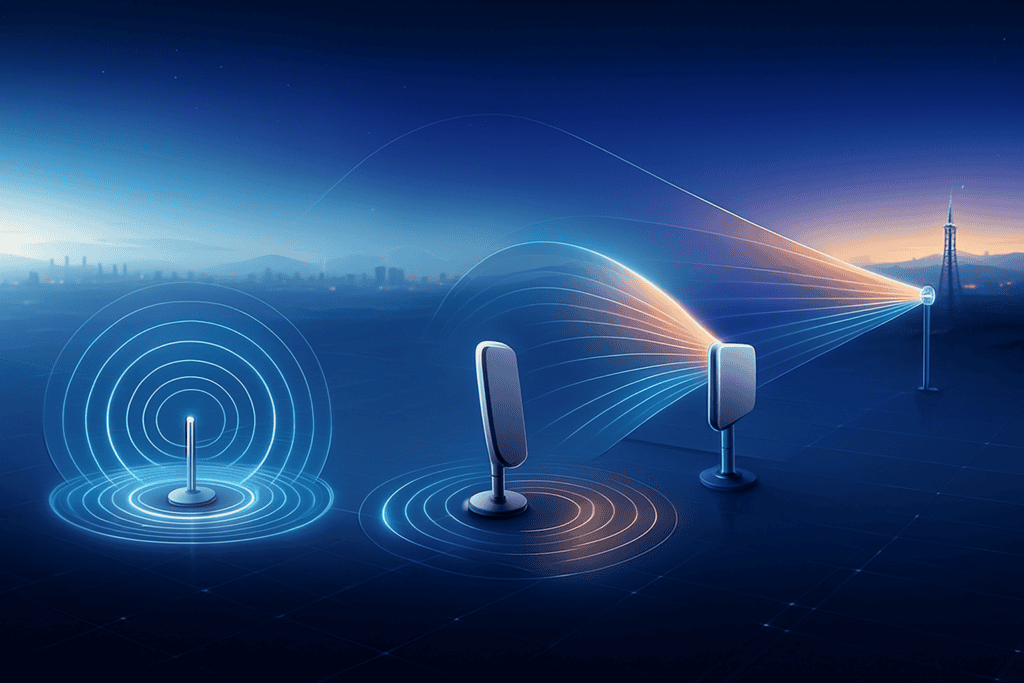
Antenna type determines how a signal is received and transmitted. An antenna can capture weak signals or focus its energy in a given direction based on its design, gain, and frequency range. Put another way, antenna type determines what kind of signal you can capture and how efficiently your device can use it.
Omnidirectional antennas are designed to receive signals in a 360º radius. and are ideal if coverage is uniform and towers are nearby. Paddle antennas are convenient, compact, and great for quick setups or strong-signal areas. They must be aimed (tuned) for optimal focus. High-gain or directional antennas concentrate signal reception toward a particular tower. They can especially benefit rural or obstructed areas.
Supporting Accessories
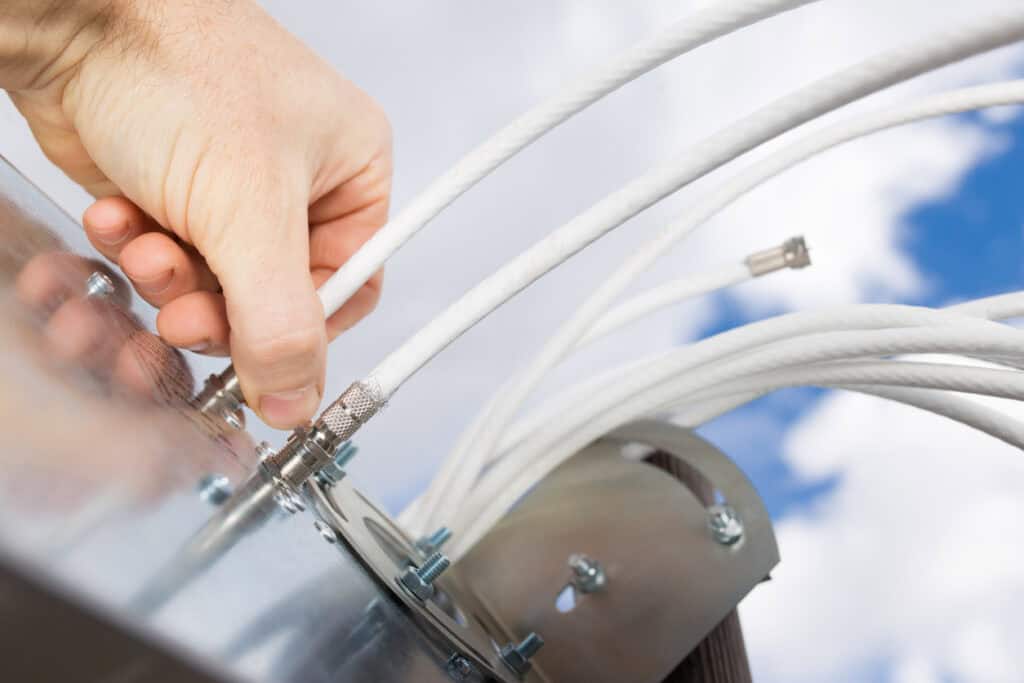
While routers and antennas get most of the attention, supporting hardware (including cables, connectors, power, and protection) can make the difference between a good connection and a great one.
For instance: Signal boosters /amplifiers can improve signal gain when installed indoors alongside a cellular router. Low-loss coaxial cables (e.g., LMR-240, LMR-400) between the antenna and router can minimize attenuation and keep the signal strong. That said, avoiding unncessary connectors can also improve performance.
Watch for moisture or corrosion at connection points (weather-sealed connectors can be a boon here). Surge protectors can protect hardware and stabilize the signal path. Even mounting brackets can help fine tune orientation toward the nearest tower.
For more information, visit the OptConnect accessories page.
The Importance of Antenna Placement in Cellular IoT
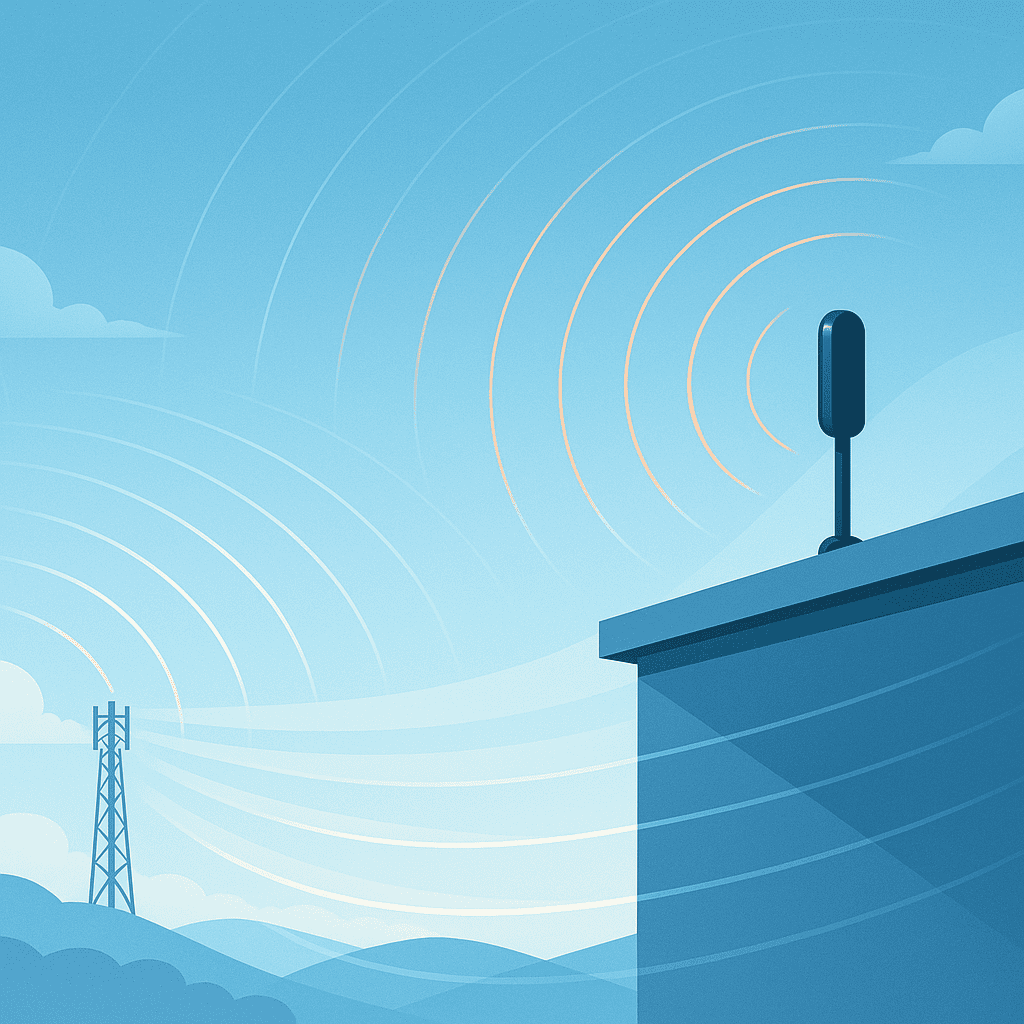
While antenna type determines potential signal reception and transmission, antenna placement determines how much of that potential the antenna can actually realize. Even the best antenna performs poorly if it’s installed behind thick walls, inside metal structures, or at ground level where obstructions block line-of-sight to the tower.
Given typical obstructions, avoid placing antennas in enclosed spaces (e.g., utility closets, walled-in rooms). The deeper you move into the core of a building, the weaker your signal reception. Elevating the antenna can dramatically reduce interference and improve the received signal-to-noise ratio. In many cases, proper placement can have as much or even more impact on performance than upgrading the antenna itself.
All antenna types should be mounted vertically. High-gain antennas (Yagi, signal repeater systems) should be installed professionally, since installation involves building wiring and both internal and external hardware.
Best Practices for Optimal Signal Strength
Now that you've learned the importance of antenna placement, you're ready for more detailed steps.
Follow the steps below for optimizing signal strength and uptime.
1. Conduct a site survey prior to installation, noting the cellular carriers that work best and checking for dead zones.
2. When checking service with your cell phone, look up a website in your internet browser to test how well you can access data.
3. If your cell phone has trouble inside a building, your OptConnect device will likely experience reception issues as well.
4. Always place antennas as near to the center/top of the mounting surface as possible (away from edges and known interference zones).
5. Mount antennas as high as possible without using cable extensions (which decrease signal strength).
6. Use cabling included with your antenna, as it is pre-tuned for your antenna type.
7. Avoid wrapping or binding excess antenna wiring around power or other cables.
8. Never place an antenna inside a metal enclosure.
9. Never mount antennas horizontally; they should always be vertical in orientation.
10. If possible, avoid placing your OptConnect router in a basement, walled-in enclosure, or below-ground structures (e.g. parking garage).
11. Always mount antennas on the outside of mobile service trailers, vehicles, or metal buildings.
12. Separate dual antennas by twice the length of the antenna (e.g., 4-inch pairs should be spaced at least 8 inches apart).
13. Avoid mismatching antennas; dual antennas must be the same size, type, and specification.
14. If using a non-OptConnect cellular antenna, ensure it's the proper type (e.g., a 2G/3G antenna shouldn't be used on a 4G LTE router).
Reliable Connectivity: Bringing It All Together
In this eBook, you have learned what causes cellular interference, how signal metrics like RSSI, RSRP, and RSRQ work, the most common antenna types, placement techniques, and installation best practices. Each of these elements plays a crucial role in building a stable, high-performing connection that keeps devices online and data flowing.
Now it’s time to put that knowledge to work.
Conduct a quick site survey. Test signal strength on location. Verify antenna placement before deployment. Small, intentional steps like these turn technical insights into reliable performance — and move your IoT project one step closer to lasting success.

Need help with your next IoT deployment?
Consult with a cellular expert at OptConnect.